![SALONIQ_Logo-High-Res_darkbg (1) (1).png]](https://faq.saloniq.com/hs-fs/hubfs/SALONIQ_Logo-High-Res_darkbg%20(1)%20(1).png?width=141&height=79&name=SALONIQ_Logo-High-Res_darkbg%20(1)%20(1).png)
What is the Summer SMS Campaign?
It's a 6-week programme of targeted SMS campaigns designed to generate appointments, increase turnover and keep clients returning more often. Each week focuses on a different client group, so you're reaching a genuinely different audience as the campaign progresses rather than messaging the same clients repeatedly.
Week 1
Week 2
Week 3
Week 4
Week 5
Week 6
What is the focus for Week One?
Week One targets your active, top-spending clients who last visited more than 8 weeks ago and currently have no future appointment booked. These are valuable clients who already know and trust your salon - a timely reminder can be all it takes to bring them back before their routine slips further.
Who exactly should I be targeting this week?
Clients who meet all of the following:
- Fall within your Top Spenders in the Last 12 Months
- Last visited more than 8 weeks ago
- Have no future booking on file
How do I create my Week One client selection?
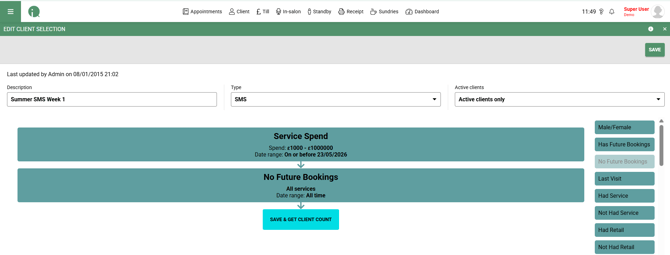
- Go to Menu > Intelligent Marketing > Client Selection > Add Selection
- Select Top Spenders in the Last 12 Months and enter a description for your own reference, e.g. Summer 2026 Week 1 - Top Spenders
- Edit the date range to More Than 8 Weeks Ago
- Add the No Future Bookings filter
- Select Save & Get Client Count
- Review your client selection, choose your SMS template and send your campaign
What SMS template should I use?
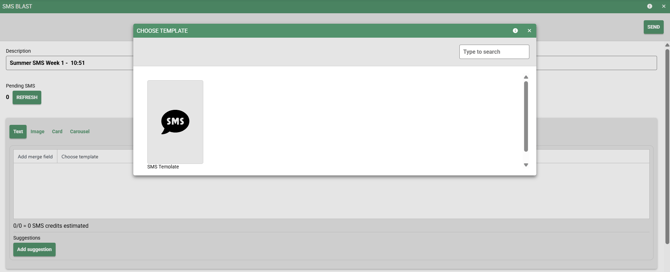
Use the pre-loaded Week One template in SalonIQ, already saved as a template - just select it. The recommended message is:
Hi [First name], it's been a little while! We'd love to welcome you back to [Salon name]. Book your next visit here: [Book online]
Why isn't there a discount in the message?
The campaign relies on timing and relevance rather than discounting. Clients act because the message feels personal and well-timed, not because it's cheap. This also protects your margins across the campaign.
What should I check before sending?
- Confirm the final SMS length in SalonIQ's own character counter (this can differ from a raw character count)
- Test the booking link
- Review the selected client list before sending
- Check there are no emojis, long dashes or special characters in the message text
What happens in Week Two?
A new client segment and message will follow next week as part of the same 6-week programme. Keep an eye on your email and the Facebook community group for details.
Summer SMS Campaign 2026: Week Two FAQ
This article answers common questions about Week Two of the Summer SMS Campaign. If you can't find what you need here, get in touch with the support team.
What is the focus for Week Two?
Week One focused on reconnecting with some of your highest-spending clients who were overdue their next visit. Week Two goes a little further back, targeting clients who visited last autumn or winter but haven't returned in 2026.
Who exactly should I be targeting this week?
Clients who meet all of the following:
- Visited your salon between 1 October and 31 December 2025
- Have not returned during 2026
- Have no future appointment booked
Why does this group matter?
It's often easier and more cost-effective to reconnect with a previous client than it is to attract someone completely new. They already know where you are, what you offer and what it feels like to visit your salon - something has simply interrupted their usual routine. The opportunity is to remind them you're still here and make booking their next appointment easy.
How do I create my Week 2 client selection?
- Go to Menu > Intelligent Marketing > Client Selection > Add Selection
- Select Blank Template
- Enter a description, such as Summer 2026 Week 2
- Add the Last Visit filter
- Choose Custom Date Range
- Set the start date as 1 October 2025
- Set the end date as 31 December 2025
- Add the No Future Bookings filter
- Select Save & Get Client Count
Take a moment to review your selected clients before sending your campaign.
What SMS template should I use?
Use the pre-loaded Week 2 template in SalonIQ, already saved as a template - just select it. Two options are available depending on how you'd like clients to respond:
Recommended message
Hi [First name], it's been a while since we've seen you at [Salon name]. We'd love to welcome you back. Book your next visit here: [Book online]
Prefer clients to call?
Hi [First name], it's been a while since we've seen you at [Salon name]. We'd love to welcome you back. Call us on [Salon number] to book.
What should I check before sending?
- Confirm the final SMS length in SalonIQ's own character counter (this can differ from a raw character count)
- Test the booking link (if using the recommended message)
- Review the selected client list before sending
- Check there are no emojis or long dashes in the message text
Why isn't there a discount in the message?
The campaign relies on timing and relevance rather than discounting. A previous client already knows your salon - the reminder itself is the reason to act, not a lower price.
What happens in Week Three?
A new client segment and message will follow next week as part of the same 6-week programme. Keep an eye on your email and the Facebook community group for details.
Summer SMS Campaign 2026: Week Three FAQ
This article answers common questions about Week Three of the Summer SMS Campaign. If you can't find what you need here, get in touch with the support team.
What is the focus for Week Three?
Weeks One and Two focused on bringing lapsed clients back through the door. Week Three looks at a different opportunity: clients who already buy your retail products.
Who exactly should I be targeting this week?
Clients who have purchased retail products within the last six months.
These clients have already shown they're willing to buy professional products from the salon. A well-timed SMS can remind them to restock before they run out and help keep their results going between appointments.
Why does this group matter?
This is easy, additional revenue from clients who already trust your recommendations. It's not a hard product sales push - it's a helpful reminder to restock something they already use and value, with the option to bring them back in for a fresh consultation too.
How do I create my Week 3 client selection?
- Go to Menu > Intelligent Marketing > Client Selection > Add Selection
- Select Blank Template
- Enter a description, such as Summer 2026 Week 3 - Had Retail
- Add the Had Retail filter
- Set the date range to within the last 6 months
- Select Save & Get Client Count
Take a moment to review your selected clients before sending your campaign.
What SMS template should I use?
Use the pre-loaded Week 3 template in SalonIQ, already saved as a template - just select it. Two options are available depending on how you'd like to frame the message:
Recommended message
Hi [First name], running low on your salon favourites? Pop into [Salon name] to restock your products and keep your results looking their best.
Prefer to connect retail with a booking?
Hi [First name], keep your results looking their best this summer. Restock your favourite products or book your next visit with [Salon name]: [Book online]
What should I check before sending?
- Confirm the final SMS length in SalonIQ's own character counter (this can differ from a raw character count)
- Test the booking link (if using the booking-linked message)
- Review the selected client list before sending
- Check there are no emojis or long dashes in the message text
Why isn't there a discount in the message?
The campaign relies on timing and relevance rather than discounting. These clients already trust your product recommendations - the reminder itself is the reason to act, not a lower price.
What happens in Week Four?
A new client segment and message will follow next week as part of the same 6-week programme. Keep an eye on your email and the Facebook community group for details.
Welcome to Week 4 of the SalonIQ Summer SMS Campaign.
They've already chosen your salon in 2026. This week, help them make their next booking.
Which clients are we targeting?
Clients who visited between January and April 2026 but have no future appointment booked.
These clients have already visited the salon during 2026, so they're still relatively warm. The opportunity is to catch them before too much time passes and make it easy for them to secure their next appointment.
Why this group matters
They already know the salon, the team and the experience. This is less about reactivating a lost client and more about protecting future revenue by encouraging them to book again before their routine slips.
Create your Week 4 client selection
Go to Menu > Intelligent Marketing > Client Selection > Add Selection
1 Select Blank Template
2 Enter a description, such as Summer 2026 Week 4
3 Add the Last Visit filter
4 Choose Custom Date Range
5 Set the start date as 1 January 2026
6 Set the end date as 30 April 2026
7 Add the No Future Bookings filter
8 Select Save & Get Client Count
Take a moment to review your selected clients before sending your campaign.
Your Week 4 SMS - recommended message
Hi [First name], ready for your next visit? We'd love to welcome you back to [Salon name]. Book your next appointment here: [Book online]
A slightly warmer version
Hi [First name], it's nearly time for your next visit to [Salon name]. Secure your appointment here: [Book online]
Make this week count
This group is warm, familiar with your salon and easy to re-engage. A simple nudge now protects revenue you might otherwise lose to a slipping routine.
Send your message while their last visit is still fresh in their mind.
Welcome to Week 5 of the SalonIQ Summer SMS Campaign.
They've already tried your salon once. This week, help turn that first appointment into the start of a lasting client relationship.
Which clients are we targeting?
One-visit clients who have no future appointment booked.
These clients have already taken the biggest step by choosing the salon once. Week 5 is about encouraging them to return before that first visit becomes a one-off.
Why this group matters
The second appointment is where a new client starts to become a regular client.
They already know the salon, the team and the experience, so the focus should be on giving them a warm reminder and making the next booking feel easy.
Create your Week 5 client selection
Go to Menu > Intelligent Marketing > Client Selection > Add Selection
1 Enter a description, such as SMS Campaign Week 5
2 Set Type to SMS and Active clients to Active clients only
3 Add the Visit Count filter, set Visits to 1 - 1 and the date range to In the last year
4 Add the No Future Bookings filter, then select Save & Get Client Count
Take a moment to review your selected clients before sending your campaign.
Your Week 5 SMS - recommended message
Hi [First name], we loved welcoming you to [Salon name]. Ready for your next visit? Book your appointment here: [Book online]
A slightly more personal option
Hi [First name], it was lovely to see you at [Salon name]. We'd love to welcome you back. Book your next visit here: [Book online]
Week 6
Get autumn booked before summer ends
Welcome to the final week of the SalonIQ Summer SMS Campaign.
Your active clients are already planning ahead. This week, help them secure their next visit and give your autumn appointment book a stronger start.
Which clients are we targeting?
Active clients who last visited between 4 months and 1 week ago, with no future autumn appointment booked.
This final week is about looking ahead. The aim is to encourage clients who are still in a regular visiting routine to secure their next appointment before September gets busy and their preferred dates disappear. The 1-week cut-off keeps out anyone who's only just been in, so the message always feels timely rather than premature.
Why this group matters
These are not lost clients. They are clients who are still in a regular visiting routine and simply haven't booked ahead yet.
We're using a tighter Last Visit window this week rather than every client marked "active" in the system. Some salons don't archive old records as often as they should, so "active" alone can include clients who haven't been seen in nearly two years - sending to that full list would cost far more in credits without improving results. Focusing on genuinely recent visitors keeps the send targeted and affordable.
A well-timed reminder can help you:
-
Protect future revenue
-
Reduce quieter gaps in September and October
-
Encourage clients to stay in a regular appointment routine
-
Secure bookings before diaries become harder to fill predictably
Create your Week 6 client selection
Go to Menu > Intelligent Marketing > Client Selection > Add Selection
-
Enter a description, such as SMS Campaign Week 6
-
Set Type to SMS and Active clients to Active clients only
-
Add the Last Visit filter, choose Custom Date Range and set it from 24 April 2026 to 17 August 2026 (4 months to 1 week before send)
-
Add the No Future Bookings filter, then select Save & Get Client Count
-
Take a moment to review your selected clients before sending your campaign.
Your Week 6 SMS - recommended message
Hi [First name], autumn is just around the corner - secure your next visit at [Salon name] here: [Book online]
A warmer alternative
Hi [First name], ready to plan your next visit? Book your autumn appointment with [Salon name] and secure the date that suits you best: [Book online]
Make this final week count
This is your chance to close out the campaign with your appointment book already looking stronger for autumn - before the September rush makes diaries harder to fill predictably.
Thank you for taking part in all six weeks of the Summer SMS Campaign - we hope it's brought valuable clients back through your door.