![SALONIQ_Logo-High-Res_darkbg (1) (1).png]](https://faq.saloniq.com/hs-fs/hubfs/SALONIQ_Logo-High-Res_darkbg%20(1)%20(1).png?width=141&height=79&name=SALONIQ_Logo-High-Res_darkbg%20(1)%20(1).png)
✨ NEW: AI Insights on Salon Dashboard
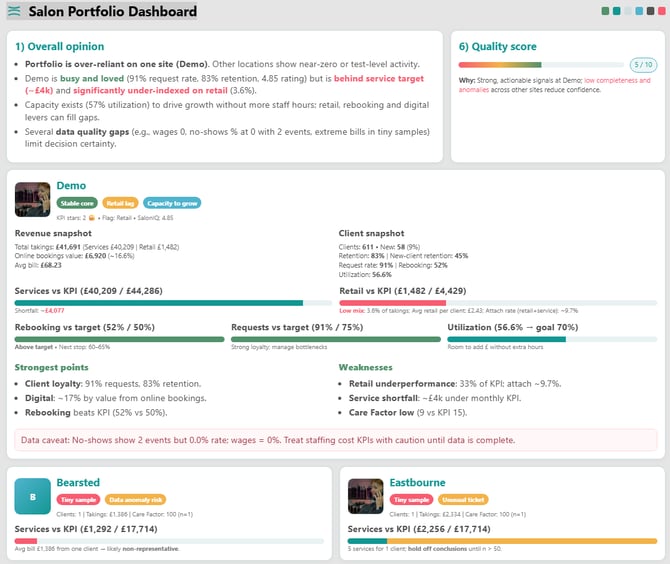
We’ve added a brand-new AI Insights agent to your Salon Dashboard, designed to help you understand what your figures are really telling you and where to focus next.
At the click of a button, AI analyses your salon’s performance across key areas such as rebooking, client retention, retail, utilisation, online bookings and revenue. For salon groups, it can also look across multiple locations to highlight where salons are performing well and where there may be opportunities to improve.
Rather than just giving you more reports and figures, AI Insights turns your data into clear, practical actions. It identifies strengths, highlights areas that need attention and provides focused recommendations and performance plans to help you and your team improve results.
Think of it as having an extra pair of eyes on your business, helping you quickly see what’s working, what needs attention and what to do next.
To view your AI Insights go to Menu > Dashboards > Salon Dashbard > Choose Date Range > Click IQ Insights
View our full guide on IQ Insights - IQ Insights Guide
IQ Insights Snapshot
🔐 IMPROVEMENT: User Security Screen
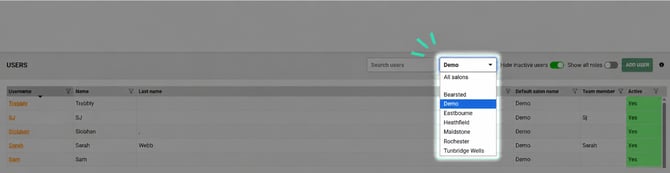
The new and improved User Security screen helps you to manage and find users quicker and easier, especially for salon groups.
The screen will now default to your home salon, helping users load more efficiently. You can also use the new salon filter to quickly view and find users linked to a specific location.
To view your users, go to Menu > Security > Users
Click to view our guide to creating users - Security Users
📊 IMPROVEMENT: Business Summary for Self-Employed Salons
Get a clearer picture of your self-employed team members performance on the Business Summary report.
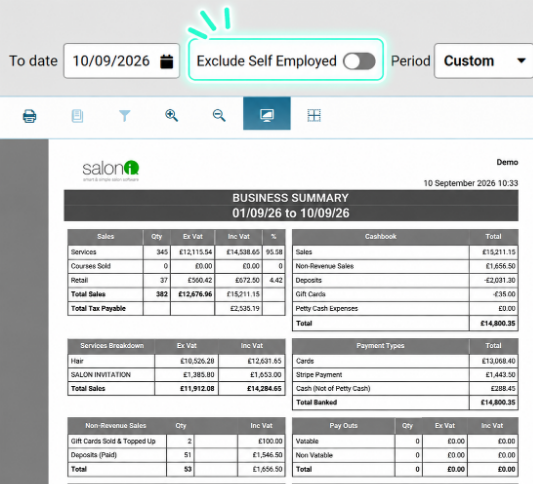
A new toggle on the Business Summary Report lets you remove all self-employed figures, including service and retail payments, from the report.
Simply switch the toggle on to view your salon-only figures, making it easier to understand your true salon revenue without self-employed takings being included.
To view your Business Summary Report Menu > Reports > Salon > Business Summary
For more information on how the Business Summary works, click here Business Summary
🔎 IMPROVEMENT: Switch Between Salons Faster
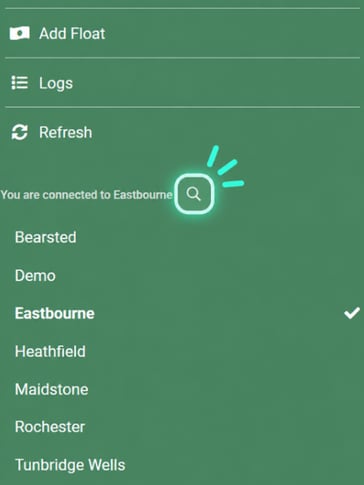
Switch between locations in your SalonIQ within seconds.
A new search button is now available on the main menu within SalonIQ, allowing you to search for the location you need rather than scrolling through your full salon list.
A simple improvement that makes navigating SalonIQ faster and easier, especially for larger salon groups.
✨ NEW FEATURE: Wella Purchase Orders
Following our partnership with Wella, we’re excited to introduce a quicker and easier way to get your SalonIQ stock order into the Wella Store.
You can now create your Wella purchase order within SalonIQ and generate a file ready to upload directly into the Wella Store. Once uploaded, your order details are brought across, removing the need to manually search for and add each product individually.
This makes placing your Wella orders faster, easier and more accurate, particularly when managing larger stock orders.
Create your purchase order in SalonIQ > Upload to Wella > Review and place your order.
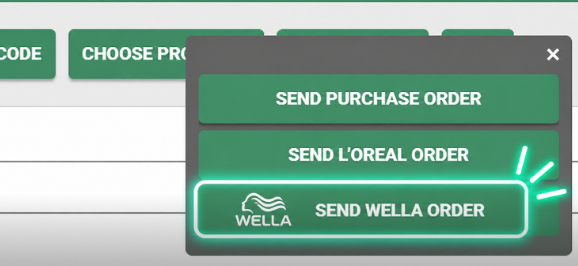
To view how to create your purchase order click here Wella Purchase Orders
October 2026 Release Notes
Adding a Walk-in Client
Book a client into the appointment book without taking their details. The appointment is processed as a walk-in client, making it a smooth process and simple for walk-in salons and barbers where clients arrive without an appointment.
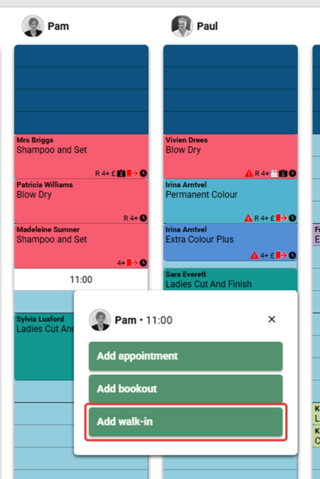
You can view our guide on how to enable and disable the walk in feature. Walk In Guide
Salonspy Reviews
Verified reviews for your business are key. Reviews shown on the booking portal now display the Salonspy logo. This shows clients that the reviews have been verified by Salonspy, giving them confidence that the feedback comes from genuine customers.
Step 1: Open the salon’s booking portal and go to the reviews page.
Step 2: Each review shows the salonspy logo underneath the star rating, confirming the review has been verified.
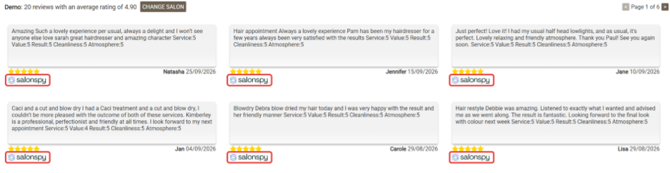
Salonspy Dashboard
For easy access, the Salonspy Dashboard has been added under Dashboards within the main menu of SalonIQ. The dashboard shows all of your salon’s Salonspy reviews, and lets you respond to reviews and log in to your Salonspy account directly from SalonIQ.
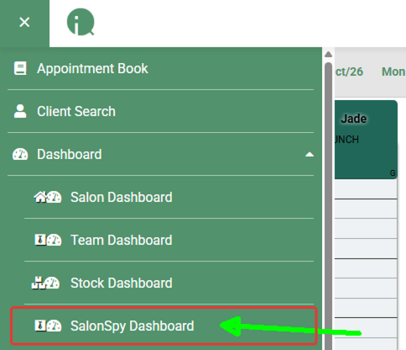
Example of Salonspy Dashboard is below;
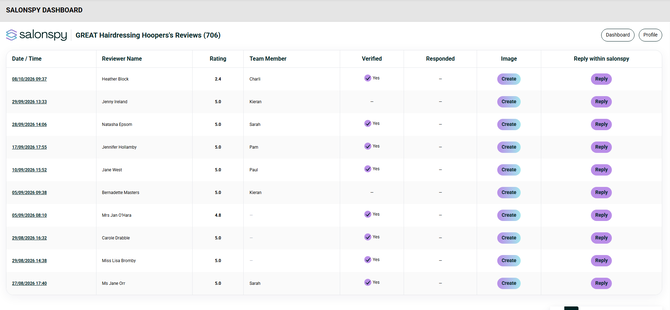
Click here to see how the Salon Spy Dashboard works Salon Spy Guide
Skin Test Questionnaire Improvement
Your clients have the option to answer questions regarding their skin. test when making a booking online. The Yes/No toggle to answer the question has been simplified. clients now choose Yes or No to confirm whether they have had the required patch test within the last six months.

Booking Portal Mobile Improvement
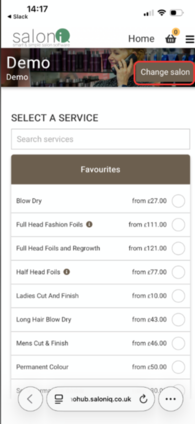
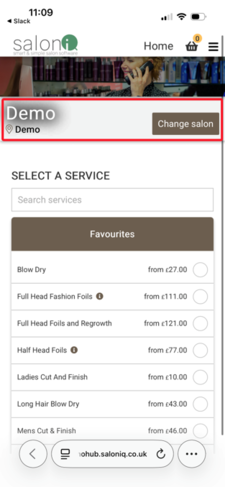
The Booking Portal header has a new design for mobile phones and other devices with small screens. The salon name and Change salon button now sit in their own bar below the banner, instead of on top of the banner image, so the banner and the button are both easier to see.
Option 1
The Change salon button sits inside the banner.
Option 2 - Under 768px design changes
The salon name and Change salon button sit in a bar below the banner.
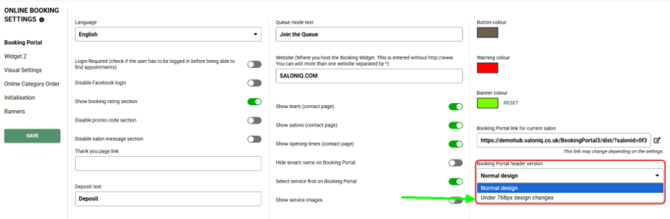
Turning on the Option 2 header
Step 1: Go to Menu > Settings > Online Booking > Booking Portal.
Step 2: In Booking Portal header version, select Under 768px design changes.
Step 3: Click SAVE.
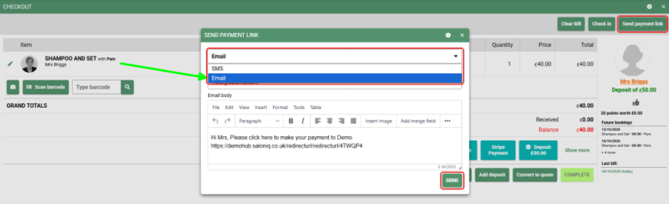
Sending a Payment Link Via Email
Payment links can now be sent to clients by email as well as by SMS.
Step 1: In the checkout screen, click Send payment link.
Step 2: In the Send Payment Link window, select Email from the dropdown.
Step 3: Check the email body. It includes the payment link, and you can edit the message if needed.
Step 4: Click SEND.
Vish+
Coming Soon............
If you need any further help with our latest features please call 01982 280 123 or email help@saloniq.com