![SALONIQ_Logo-High-Res_darkbg (1) (1).png]](https://faq.saloniq.com/hs-fs/hubfs/SALONIQ_Logo-High-Res_darkbg%20(1)%20(1).png?width=141&height=79&name=SALONIQ_Logo-High-Res_darkbg%20(1)%20(1).png)
Increase turnover - with more clients, spending more, more often.
Week 1
Week 2
Week 3
Top Tips
Week 1
-1.jpg?width=670&height=377&name=2024%20(1)-1.jpg)
Our New Year Rebooking Campaign is here!
We are excited to introduce our New Year Rebooking Campaign, designed to help you keep your diary full during the quieter weeks after the Christmas rush.
🎯 What is this campaign about?
This SMS campaign is designed to encourage existing clients who do not have a future appointment booked to plan their next visit during January and February.
📅 How it works
Duration: The campaign runs over 3 weeks
Strategy: A series of targeted SMS messages, each week focusing on a different client group
Goal: Drive forward bookings during traditionally quieter periods
💡 Why use this campaign?
Fill quieter diary gaps: Encourage clients to rebook sooner rather than later
Increase revenue: Turn existing clients into confirmed future appointments
Simple to run: Ready-made messages and clear client filters
Let's dive in
For Week 1, we recommend focusing on client who haven't visited since pre November 2025.
Creating your selection
Menu > Intelligent marketing > Client Selection > Add Selection > Select ‘Blank Selection’ > Enter description > Add filter "Last Visit", click on the filter again to edit and select "more than 10 weeks ago" > Add filter ‘No future bookings’ > Save & Get Client Count > View Clients > Select your template/type SMS > Check character count > send yourself a test message by selecting any client and using your number > Send.
We have added some templates for you to use in SalonIQ or you can create your own of course.
Template (Week 1) Example 1
Hi <FirstName>, happy New Year. It's time to book your next appointment at <Salon Name>, Call <Salon Number> or book online <Book Now>
Template (Week 1) Example 2
Hi <Client Name>, just a quick reminder to book your next visit to <Salon Name>. A great time to refresh after Christmas Book online Here <Book Now>
Template (Week 1) Example 3
Hi <Client Name>, we noticed you do not have your next appointment booked yet. Secure a January appointment here: < Book Now >
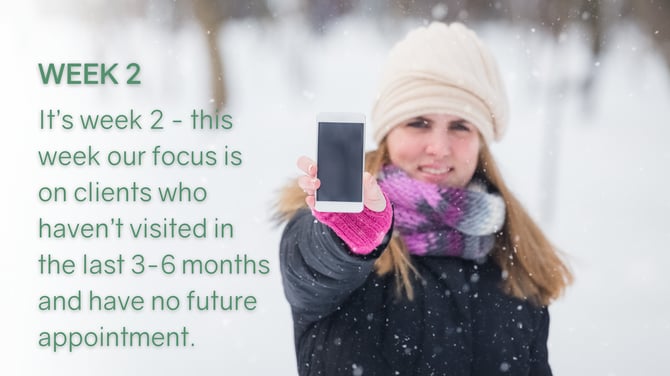
If you have already run Week 1 of the New Year Rebooking Campaign, it is time to move onto Week 2.
Week 2 is designed to help you bring established clients back into your diary. These are clients who have visited you multiple times in the past but have not returned for a while and do not currently have a future appointment booked.
This is a strong opportunity to re-engage good clients who may have dropped out of routine during the busy end-of-year period.
Who to target in Week 2
For best results, Week 2 should be sent to clients who
-
Have visited 3 or more times
-
Have not visited since before late October
-
Do not have a future appointment booked
-
These clients already know your salon and are more likely to return with a simple reminder.
Let's dive in
How to create your client selection
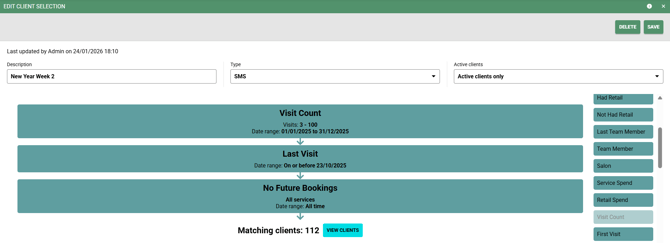
Go to: Menu > Intelligent Marketing > Client Selection > Add Selection > Select Blank Selection
Then add the following filters:
Visit Count
Set visits to 3 to 100
Set the date range to 01/01/2025 to 31/12/2025
Last Visit
Set the date to on or before 23/10/2025
No Future Bookings
All services
Date range: All time
Once added:
Save your selection
Click Get Client Count
Select View Clients to review
Sending your Week 2 SMS
- Choose one of the Week 2 SMS templates provided
- Check the character count
- Send yourself a test message
- When ready, send to your selected clients
- Make sure your message links directly to online booking
We have added some templates for you to use in SalonIQ or you can create your own of course.
Template (Week 2) Example 1
Hi <FirstName>, It's time to book your next appointment at <Salon Name>, Call <Salon Number> or book online <Book Now>
Template (Week 2) Example 2
Hi , just a quick reminder to book your next visit to . A great time to refresh your look Book online Here
Template (Week 2) Example 3
Hi , we noticed you do not have your next appointment booked yet. Secure your appointment here: <Book Now>
If you have any questions, our team is happy to help.
-2.png?width=670&height=377&name=2024%20(2)-2.png)
If you have run Week 1 and Week 2 of the New Year Rebooking Campaign, you are now ready to move onto Week 3.
Week 3 focuses on your most loyal or regular clients who do not currently have a future appointment booked. These are clients who visit you consistently and are more likely to plan ahead when prompted.
This final week is about locking in future bookings and creating stability in your diary through February and beyond.
Who to target in Week 3
For best results, Week 3 should be sent to clients who:
Visit you regularly or have a higher visit count
Are considered loyal or high value clients
Do not currently have a future appointment booked
These clients already have a strong relationship with your salon and respond well to messages that encourage forward planning.
How to create your client selection
Go to:
Menu > Intelligent Marketing > Client Selection > Add Selection > Select Blank Selection
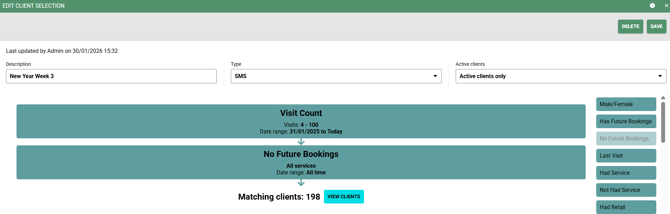
Then add filters that identify your most loyal clients, for example:
-
Visit Count set minimum to a higher number that reflects your regular clients for example 4 - 100
-
Select date filter to be "in the last year"
-
No Future Bookings
-
-
All services
-
Date range: All time
-
Once added:
-
Save your selection
-
Click Get Client Count
-
Select View Clients to review
Sending your Week 3 SMS
-
Choose one of the Week 3 SMS templates provided
-
Check the character count
-
Send yourself a test message
When ready, send to your selected clients
Make sure your message links directly to online booking
We have added some templates for you to use in SalonIQ or you can create your own of course.
Template (Week 3) Example 1
Hi <FirstName>, It's time to book your next appointment at <Salon Name>, Call <Salon Number> or book online <Book Now>
Template (Week 3) Example 2
Hi <FirstName>, just a quick reminder to book your next visit to <Salon Name> . A great time to refresh your look Book online Here <Book Now>
Template (Week 3) Example 3
Hi <FirstName>, we noticed you do not have your next appointment booked yet. Secure your appointment here: <Book Now>
If you have any questions, our team is happy to help.
IQ Top Tips
- When sending an SMS campaign please ensure you are aware of the length of the message and try to keep the message within 160 characters where you can.
- Make full use of the merge fields available to you, these help to personalise your message to your clients.
- Have a second person read your message checking for spelling and grammar mistakes, you will be surprised what you miss by looking too much.
- Send your SMS at around 8am in the morning.
- Ensure you include a call to action; this means that you are telling your clients what to do with the message. i.e. Call 01234 567890 to book now, click here to book (include your web URL or Book Now merge field)
- Create some urgency behind the message to encourage your clients to take immediate action i.e. limited availability, only 10 bookings left, book before it’s too late, don’t miss out.