![SALONIQ_Logo-High-Res_darkbg (1) (1).png]](https://faq.saloniq.com/hs-fs/hubfs/SALONIQ_Logo-High-Res_darkbg%20(1)%20(1).png?width=141&height=79&name=SALONIQ_Logo-High-Res_darkbg%20(1)%20(1).png)
.png?width=350&height=175&name=Connect%20(1).png)
What is IQ Connect?
How does IQ Connect work?
What if my services have a required service?
How does it work if a client needs a skin test?
What if my salon takes deposits?
I have multiple Salons how will it work?
Will the AI Agent offer upgrades?
Does my AI Agent need to be active at all times?
Can I name my AI Agent?
How do cancellation and rescheduling work?
How does IQ Connect recognise existing clients?
Can clients leave a message for the salon with their booking?
What if the client wants to speak to the salon?
How do I sign up and what is the pricing?
Can I see an overview of the calls?
Can I arrange a demo?
What is IQ Connect?
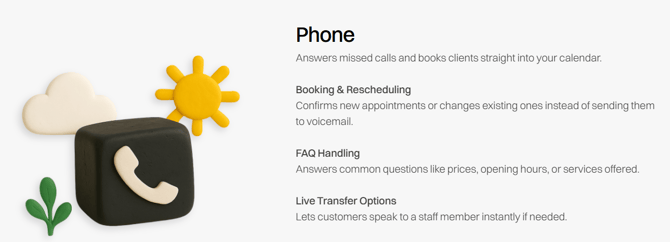
IQ Connect is an AI assistant designed to help manage customer communication efficiently. It ensures you never miss a call by handling incoming calls, answering common questions, booking clients and amending appointments. Powered by Callpad.ai, it integrates seamlessly with your SalonIQ appointment page.
Does this replace my VOIP service or current phone provider?
No, this doesn’t replace your VOIP service or phone provider. Your existing setup stays exactly the same — you simply divert calls to your AI assistant whenever you want it to step in.
.png?width=670&height=372&name=Subscriptions%20cover%20pic%20(7).png)
How does IQ Connect work?
Your salon number stays the same. A call divert is set up so all calls continue to reach your existing number, no provider changes needed. When a client calls, the AI receptionist will answer and handle their enquiry. If they choose to make a booking, it will be added instantly to your SalonIQ appointment page, just like an online booking.
You can set up diverts in 2 ways:
- Full Call Diversion - The AI receptionist answers immediately by diverting all calls.
- Unanswered Call Diversion - The AI receptionist only answers calls you miss.
We strongly suggest Unanswered Call Diversion as it provides the best mix of personalised service while never missing a client.
If needed: Call Forwarding
What if my services have a required service?
IQ Connect reviews all your required services. For example, if a colour service needs a cut and finish, or a nail service requires a soak-off, the AI agent will guide the client to select the correct service.
How does it work if a client needs a skin test?
If a patch test is needed 48 hours before the appointment, it will be added to the client’s confirmation email after they book. The AI agent won’t allow appointments within 48 hours if the client doesn’t have a current skin test. You can edit the 48-hour rule in your SalonIQ settings.
What if my salon takes deposits?
If you require a deposit for each booking, you’ll need to include the payment link in your confirmation SMS or email. Once the booking is made, the client will receive the link and, after completing the payment, it will automatically appear on their account.
I have multiple Salons how will it work?
Each salon will have its own dedicated phone number, which will be diverted to the salon’s main line.
Coming Soon… If a client calls and cannot find their appointment at that location, the AI Agent will ask whether they would like to check availability at one of your other salons. You can enable the multi-location feature, and which salons to switch them on for.
Will the AI Agent offer upgrades?
Coming soon...
Does my AI Agent need to be active at all times?
No, that’s the beauty of IQ Connect. You can turn your agent on or off at the touch of a button. It’s perfect for covering receptionist holidays, sick days, out-of-hours periods, and weekends.
.png?width=670&height=372&name=Blog%20Images%20(3).png)
Can I name my AI Agent?
Yes, you can rename your AI Agent, by default it is called Amy.
Will clients know they are speaking to AI?
You can customise your AI receptionist’s greeting however you like, and it will include a brief note that the call is being recorded for GDPR compliance. If a client asks whether they’re speaking with AI, Amy will confirm it clearly and politely.
How do cancellations and rescheduling work?
The AI Agent can cancel and reschedule bookings according to the rules you have set in SalonIQ. If you do not allow cancellations or rescheduling within 48 hours, the AI Agent will notify the salon by email so you can contact the client directly.
If a reschedule request is made within the permitted timeframe, the new appointment will be added to SalonIQ while the original booking remains in place. The salon will receive an email with the client’s details and the updated dates. You can then click Yes to confirm, which will remove the old appointment from SalonIQ.
You always have the opportunity to confirm or reject cancellation and rescheduling requests.
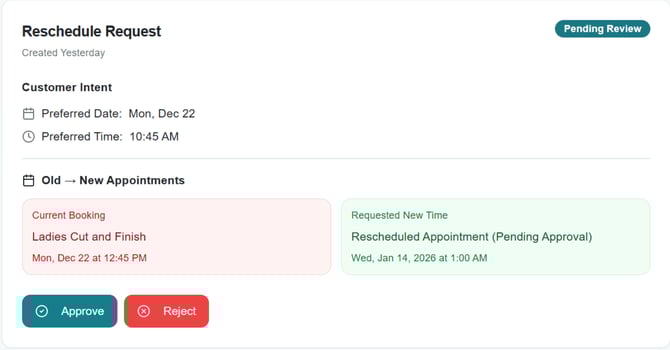
If the service the client wishes to move is not available online this will not be rescheduled and an email will be sent to the salon to contact the client.
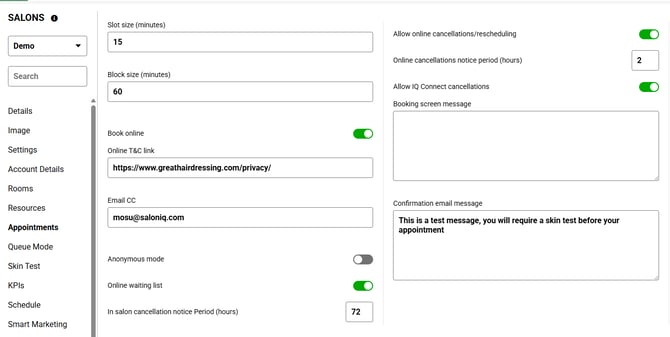
You can check your cancellation settings in SalonIQ by going to Menu > Settings > Salons > Appointments.
- Allow IQ Connect Cancellations - When this setting is enabled, clients will be able to cancel their appointments at any time.
- Allow Online Booking Cancellations - If Allow IQ Connect Cancellations is switched off, the system will follow your standard online cancellation settings instead. For example, if online cancellations are limited to 48 hours before the appointment, clients will only be able to cancel within that 48-hour window.
How does IQ Connect recognise existing clients?
The agent identifies the phone number the client is calling from. If that number exists in SalonIQ, the appointment will be booked using their existing record card. If the number is not recognised, a new record card will be created.
Can clients leave a message for the salon with their booking?
Yes, if your client leaves you a message along with their booking this will be added onto the clients booking as a memo.
What if the client wants to speak to the salon?
If the client wants to speak to the salon or leave a message, an email will be sent to the salon to contact the salon directly.
How do I sign up and what is the pricing?
One off Activation & Set up £297
Solo Bookable Team Member £100 + VAT / month
2-10 Bookable Team Members £150 + VAT / month
11-20 Bookable Team Members £250 + VAT / month
21+ Bookable Team Members £POA + VAT / month
Can I see an overview of the calls?
You will have access to your own IQ Connect Dashboard, where you can view the results of your calls. This includes any calls requiring review, your first-time resolution rate, and the revenue generated from bookings made by the agent.
It’s also a useful tool for monitoring the types of enquiries clients are making, as well as identifying the busiest days and times on your phone lines.
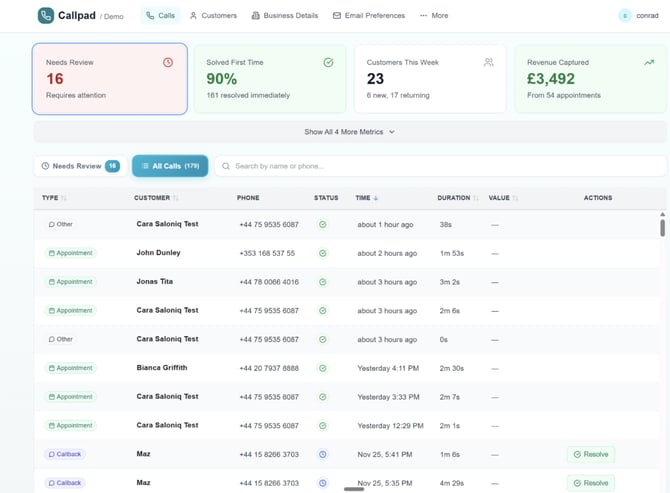
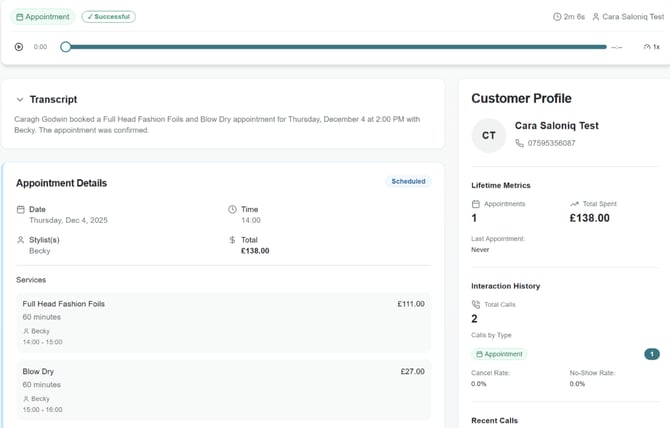
All calls are recorded, and the AI Agent informs the client of this before continuing. Each call generates a customer profile, where you can listen to the recording, view the transcript, and see all details of the client’s booking.
Can I arrange a demo?
Of course, click the link to arrange your demo and choose a date and time that suits you.
Book a demo
If you need any help or further information on IQ Connect please call 01892 280 123 or email help@saloniq.com