![SALONIQ_Logo-High-Res_darkbg (1) (1).png]](https://faq.saloniq.com/hs-fs/hubfs/SALONIQ_Logo-High-Res_darkbg%20(1)%20(1).png?width=141&height=79&name=SALONIQ_Logo-High-Res_darkbg%20(1)%20(1).png)
How to set up 'Clean down time'
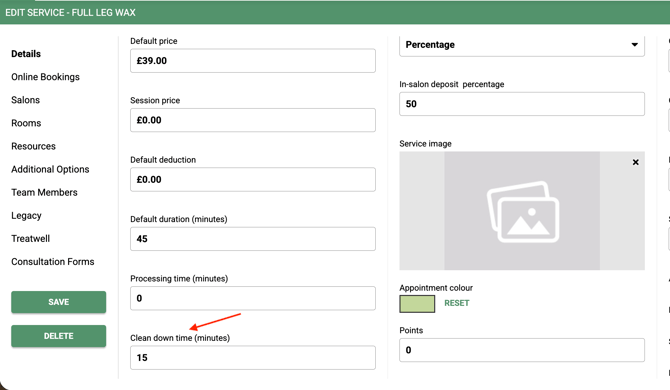
Menu > Settings > Services > Clean down time (minutes)
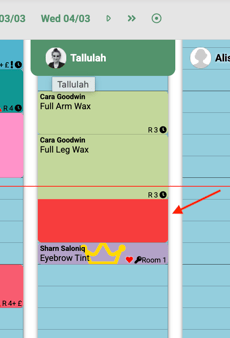
When you book a service that has a clean down time, the clean down time is added to the end of the service/s as shown below by the red area.
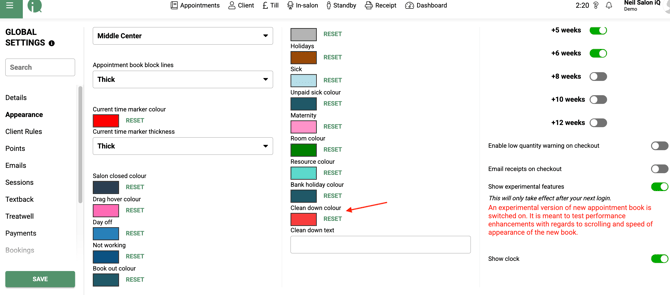
The colour of the Clean Down Time can be changed in the Global Settings > Appearance.
Please note:
-
The Clean Down Time cannot be amended (shortened or lengthened).
-
Users in the salon can book an appointment in the Clean Down Time, clients booking online will also be able to book over a clean down time.
- Clean Down time will not be counted as utilised on the team members column .
- If more than one clean down time is added, the times will be added together at the end of the clients appointment.
- Clean Down time will not show on the clients receipt.
- Set the clean down time to match your existing appointment slot times
- When clean down time is set to a negative value, the block will be added to the start of the client’s booking. The client’s SMS reminder will then show the time including this block.
If you require any further support with clean down time, please call us on 01892 280123 or email help@saloniq.com