![SALONIQ_Logo-High-Res_darkbg (1) (1).png]](https://faq.saloniq.com/hs-fs/hubfs/SALONIQ_Logo-High-Res_darkbg%20(1)%20(1).png?width=141&height=79&name=SALONIQ_Logo-High-Res_darkbg%20(1)%20(1).png)
Week 1
Week 2
Week 3
Week 4
Week 5
Week 6
Top Tips How to view your results
Week 1
Week 1: VIP Christmas Priority
Send from Monday 12 October 2026
Start your 6 Weeks of Christmas SMS campaign with the clients who already know and love your salon.
This week, we're focusing on your most loyal, frequently visiting clients who haven't yet secured their next appointment.
Who should you target?
For Week 1, we're keeping the client selection simple.
Target clients who:
✓ Have visited 4 or more times in the last 12 months
✓ Have no future booking
These are some of your most loyal clients, so giving them first choice of your Christmas availability feels helpful rather than promotional.
It also gives them the chance to secure their preferred stylist, therapist, date or time before your busiest weeks start filling up.
Step 1: Create your VIP client selection
In SalonIQ:
- Go to Menu > Intelligent Marketing
- Open1 Client Selection
- Create a Add selection
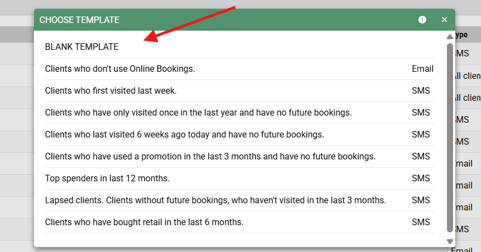
- Select Blank Template
- Name your selection something easy to recognise, such as:
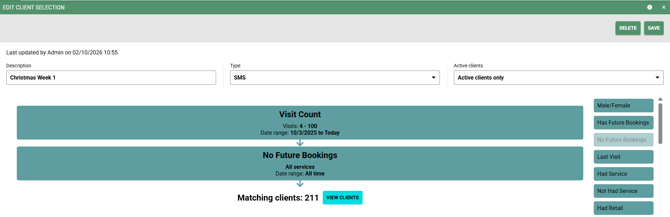
Christmas 2026 - Week 1 VIP Clients - Add the criteria segment "Visit Count" and click to edit minimum visits to 4 or more and click the date and select "In the last year" and save.
- Add No Future Booking segment.
- Save your selection and check your client count
Quick check: Before moving on, take a look at the clients in your selection to make sure the results look right for your salon. You can amend the minimum visits or time frame to increase or decrease the number of clients you wish to market to.
Step 2: Create your message
Once your VIP client selection is saved, select view clients and you're ready to create your SMS message.
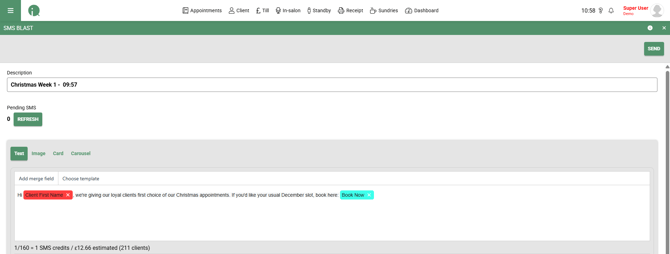
Select Choose template and search, then click on "Christmas Week 1"
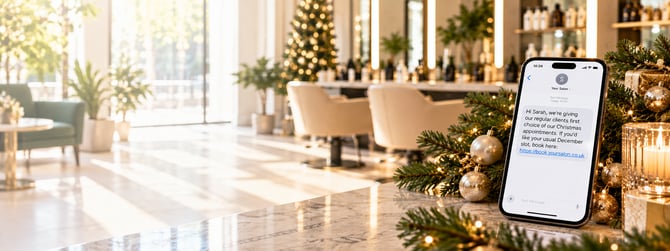
Hi [First name], we're giving our loyal clients first choice of our Christmas appointments. If you'd like your usual December slot, book here: [Book online]
You can simply now send this message, edit to your own words or create your own bespoke message by typing in the details box and inserting the merge fields.
Step 3: Check before you send
Before sending your campaign, take a moment to check:
✓ You've selected the correct Week 1 VIP client selection
✓ Your online booking link has been added
✓ The SMS reads correctly by using the test SMS button
✓ You're happy with the number of clients receiving it
✓ You've checked the final SMS credit/character count
We recommend sending yourself a test first so you can see exactly how the message will appear on a client's phone.
Once you're happy, you're ready to send. 🎄
Week 2
Week 2: Turn new clients into Christmas clients
Send from Monday 19 October 2026
This week, we're focusing on clients who have recently discovered your salon but haven't yet booked their next appointment.
They've already chosen you once. Now let's give them a timely reason to come back and turn that first visit into a second.
Who should you target?
For Week 2, target clients who:
✓ First visited within the last 6 months
✓ Have no future booking
These clients are still relatively new to your salon, making this a great opportunity to encourage that all-important next visit.
Christmas gives you a natural reason to get back in touch without needing to offer a discount.
Step 1: Create your New Client selection
In SalonIQ:
- Go to Menu
- Select Intelligent Marketing
- Select Client Selection
- Create a new selection
- Choose the selection Clients who first visited last week from the pop up
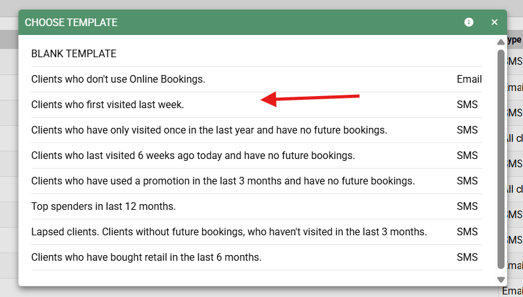
- Click on the First visit segment box and change the date period from last week to last 6 months
- Add No Future Appointment segment
- Give your selection a clear name, such as:
Christmas 2026 - Week 2 New Clients - Save your selection and check your client count
Quick check: Take a look at the clients in your selection before moving on. You should be seeing relatively new clients who don't currently have another appointment booked.
Step 2: Create your message
Once your VIP client selection is saved, select view clients and you're ready to create your SMS message.
Select Choose template and search, then click on "Christmas Week 2"
Hi [First name], we'd love to welcome you back before Christmas. Secure your next appointment at [Salon name] here: [Book online]
Use the relevant SalonIQ merge fields for First Name, Salon Name and your online booking link, rather than typing these details manually.
Step 3: Check before you send
Before sending your Week 2 campaign, check:
✓ You've selected the correct Week 2 New Clients selection
✓ Your Salon Name merge field is correct
✓ Your online booking link has been added
✓ The message reads correctly in the preview
✓ You're happy with the number of clients receiving it
✓ You've checked the final SMS character and credit count
We recommend sending yourself a test first so you can see exactly what your clients will receive.
Once you're happy, you're ready to send.
Track your campaign results
Once your SMS has been sent, don't forget to check back and see how it performed.
SalonIQ tracks your campaigns for you, so you can see how many clients received your message, how many returned, and the value of the appointments generated.
How to find your campaign results
In SalonIQ:
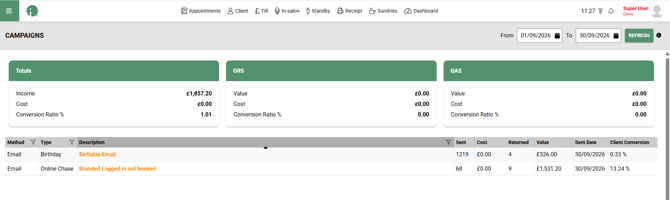
Menu → Intelligent Marketing → Campaigns
At the top of the Campaigns screen:
- Set the From date to the date you sent that week's campaign.
- Set the To date to today's date.
- Click Refresh.
- You'll see the campaigns sent during that period listed underneath.
- Find the relevant 6 Weeks of Christmas SMS campaign you want to review.
What do the results mean?
You'll see several figures alongside each campaign:
Sent
The number of clients your campaign was sent to.
Cost
The total cost of sending that campaign.
Returned
The number of clients from that campaign who have subsequently returned/booked following the campaign.
Value
The value attributed to those returning clients, helping you see how much revenue the campaign has generated.
Sent Date
The date the campaign was sent.
Client Conversion
The percentage of clients who received the campaign and have subsequently returned.
Give your results time to build
Don't worry if the figures are low when you first check.
Your results can continue to build after the SMS has been sent as clients receive the message, click through and make their appointments.
Come back and check your campaign again over the following 7-10 days to see how it develops.
Keep an eye on all six weeks
As you work through the 6 Weeks of Christmas SMS, you'll be able to use the Campaigns screen to see which audiences and messages are driving bookings for your salon.
By the end of the six weeks, you'll have a much clearer picture of:
✓ How many clients you've reached
✓ How many have returned
✓ The value generated from your campaigns
✓ Your client conversion rate
One targeted SMS each week. Then come back and see what it delivered.