![SALONIQ_Logo-High-Res_darkbg (1) (1).png]](https://faq.saloniq.com/hs-fs/hubfs/SALONIQ_Logo-High-Res_darkbg%20(1)%20(1).png?width=141&height=79&name=SALONIQ_Logo-High-Res_darkbg%20(1)%20(1).png)
The walk-in feature lets you book a client into the diary without taking their details. The booking is processed as a walk-in client, making it quick and simple for walk-in salons and barbers where clients arrive without an appointment.
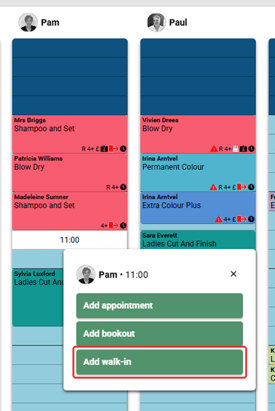
Step 1: In the appointment screen, click on the team member’s column at the time the client will be seen. A menu will appear showing the team member and the selected time.
Step 2: Click Add walk-in. The booking is created as a walk-in client, so there is no need to enter the client’s name or contact details.
How to disable walk in Client
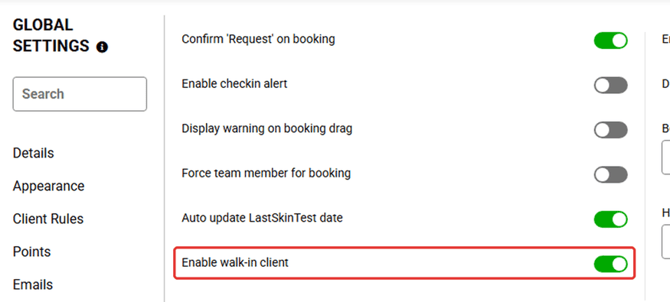
The walk-in feature can be switched off if your salon does not take walk-in clients.
Step 1: Go to Menu > Settings > Global > Bookings.
Step 2: Turn off the Enable walk-in client toggle.
If you need any further help with the walk in feature you can call us on 01892 280 123 or email help@saloniq.com